Showing posts sorted by date for query Games. Sort by relevance Show all posts

How to mod Saints Row 3 USB version


Your Saints Row 3 Gamesave on a USB (flash drive)
Horizon Download

1. Move your SR3 gamesave onto a USB (flash drive).

2. Open up Horizon.

3. Go to Games.

4. Go to Saints Row 3, and it should either say AUTOSAVE or something else (if you saved it yourself, it won't say AUTOSAVE).

5. Drag that right on to your desktop and minimize Horizon.

6. Open up the SR3 editor, and click on Open.

7. Find the file you just dragged to your desktop, and click Open.

8. Here, you can change whatever you choose to change, it is up to you.

9. Once you are finished changing everything, click Save. It will automatically Rehash and Resign for you when you click Save.

10. Exit out of SR3 editor and go back to Horizon.

11. Drag your gamesave from your desktop right back into where you clicked it before.

12. When it asks if you want to overwrite it, click Yes.

13. Click OK at the message that pops up, and go ahead and eject your USB (flash drive) from your computer and insert it back into your Xbox 360.

14. Move your gamesave back onto your Hard drive, and you're done!


Credits to: MrImaginous

How to mod Waw Zombies Online(Multiplayer)

How to mod Waw Zombies Online(Multiplayer)

1.Start a new solo campaign

2.When you see "Saving" at the top then you save and quit

3.Go to the dash board and go to system settings ~ memory ~ hard drive ~ games ~ Call of Duty: World at War

4.Move your save game to your Usb *Make sure it is configured!!*

5.Put Usb in Computer and open up Modio

6.Open up Usb Xtaf

7.In Usb Xtaf go to File~ Open First Usb Drive ~ Content ~ E00 Folder then keep clicking till you get to the save game

8.Drag the save game to your desktop and then into modio

9.Drag the modded save game next to it

10.Copy and Paste the Device ID and the Profile ID into the modded one

11.Rehash & Resign two times

12.Exit out of Modio and go back into Usb Xtaf

13.Delete you save game and drag the modded one in

14.Put the Usb back into Xbox 360 and move the save game back to the Hard drive

15.Load up WaW abd resume the campaign

16.When you are able to walk then press back/select

17.Get a friend to invite you out of campaign(Do NOT save and quit again)

18.Activate different mods(How to below)


How to activate mods:
Back - Activates Mods & Dvars
- Right Bumber - Noclip
- Left Bumber - God
- Dpad Right - Give All Weapons
- Dpad Down - Drop Weapon
- Dpad Left - Toggle Gravity (High Jump, Super Jump, Increased Jump)
- Dpad Up - Toggle Arcade Mode (100000 Points for Revive)

Dvars:
- Jump Height - 999
- Unilimited Ammo
- Dogs Don't Move
- Zombies Float Up When Dead
- Fast Sprint
- PAINTBALLS For Ammo
- Increased Walk Speed
- Force Host
- Party Starter (Starts your own party, lets you be the first in pre-game lobby.
- All Dev Clantags (RAIN / CYLN / CYCL / MOVE / KRDR / .... / ****)
- Triple Tap (Buy Double Tap First)
- Long Distance Knifing
- Long Distance Reviving
- Text On Screen When Activating Mods
- Fall Damage Minimum Height 9998
- Fall Damage Maximum Height 9999
- Last Stand Time Longer


Links:

Save Games - mediafire.com/?tip26vw5dw6nb32

Credits to: Catch_My_Grenade

How to uncorrupt a profile from a banned xbox 360

How to uncorrupt a profile from a banned xbox 360


As you may know once you are banned from Xbox live if you use that banned console to play games and then put your hard drive back into an unbanned console your profile shows as corrupted and you have to recover Gamertag from Xbox Live. In doing this though you lose any achievements you may have obtained on the banned box. I have found a way to un-corrupt the profile without Recovering. 

What you need: 

A Data Transfer Cable for Xbox 360 or disassemble your hard drive. 
CON Flag Remover 

Xplorer360 
Hash Block Calculator 
Step 1: 

First thing you want to do is get a back-up of your current profile. You can skip this step and go to Step 3 B if you already have achievements on your banned console you wish to transfer to an unbanned. This is also just a precaution and can be skipped if you don't wish to make a back up. 

Either connect your hard drive to your PC through the Data Cable or disassemble the hard drive and connect using normal Sata connections. 

Next open "Xplorer360". Click "Drive>Open>Harddrive or Memory-card". 


Select "Partition 3", then expand "Content" 

Under this will be several folders Starting with "E". These folder names are your profile ID so I can't say for sure they name of yours but if there is only one profile it will be easiest. 

Expand your E folder, "FFFE07D1", then "000100000" 

Now you will see you Profile file 


Drag this file onto your desktop or any where you can find it. 

Step 2. 
Now make a back up just in case. right click on the file you just dragged from the hard drive. Click copy. right click again and click paste. you can then rename this file what ever you want just remember it is the Original. I would suggest just adding ORG or BAK to the end of the file name. 

Step 3. 
A:For use with a previously recovered Gamertag that is not corrupted 
You can now put your Hard drive onto your banned console. I would suggest either just playing a game a or getting an easy achievement to test. Then move on to Step 4. 

B: For those with a still corrupted Gamertag 
If you have a Corrupted Gamertag that you have received addition Achievements you can uncorrupt that gamertag and have it add those achievements to your online Gamerscore. Just remember not to recover your tag from Live unto after you have fixed this original corrupted one. Doing so will prevent you from ever being able to add those achievements to your gamerscore. 

Step 4: 
Once you are ready to move your Profile back to a Unbanned Console hook the hard drive back up to the PC. Repeat steps 1 & 2. This new profile will have all the achievements you just obtained on it. 

Step 5: 
Open "CON Flag Remover" 


Click "Open Profile". Browse for the file you just got in Xplorer360. 
Click "Remove Flags". 
Step 6: 

Open "Xbox 360 Hash Block Calculator" 
Click "File>Open" 
Open the file you just removed CON Flags From 
Click "Tools>Calculate Hash Blocks" 


Step 7: 
Open Xplorer360, open you hard drive. Navigate to where your profile is stored. Drag the file you you have edited onto the Xplorer360 window. Tell it to replace the file if asked. Disconnect hard drive from PC and reconnect to Xbox. 

It may take up to 30 minutes before your new score is seen by friends or on XBOX.com. 

This must be done each time hard drive is connected to a banned console. Its a bit of a pain but does make it so you can continue to get achievements on a banned console.


Credits to  NeedHelpPmMe
How to burn XGD3 games(Latest-Tutorial)

How to burn XGD3 games(Latest-Tutorial)

Hi, in this tutorial I will be explaining how to burn the latest topology type of an Xbox 360 ISO.

Difficulty:Noob-Proof;

1.Have your ISO ready.

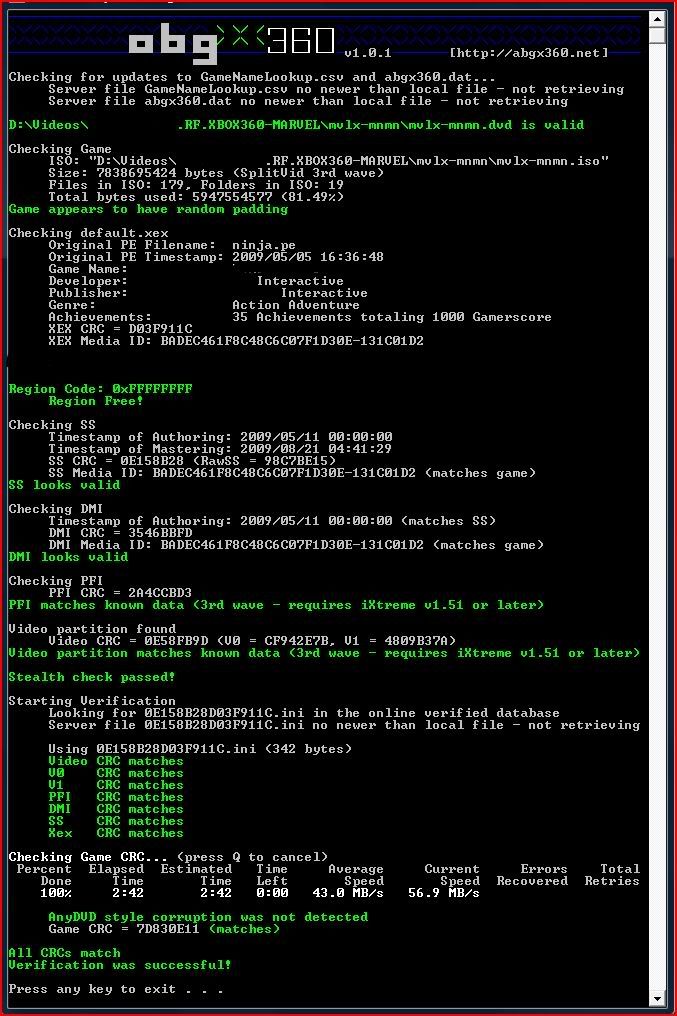
(All XGD3 games need to be checked for any missing topology data, So it is required to run your ISO through Abgx360)
Download Abgx360

2.Open Abgx360.

3.Open your ISO, by clicking where the red pointer is showing.


4.Change Autofix Thershold: To Level 3. (Circled Red)

5.Wait until All verifications pass.


6.Once Everything passes, press any key and close abx360.


7.Open Imgburn 2.XXX.

8.Load Disc Image to Imgburn. The disc image is the small file placed in the same folder as your ISO.

9. Go to Settings -> write and check "Calculate Optimal".


10. Click "OK", Start burn, make sure to un-check verify.
11. When A small box opens up, select "Truncate Burn" and click ok.
12.Wait until the burn is finished.
13.Done, Start Playing your ISO.
How to patch XGD3 games with the latest topology

How to patch XGD3 games with the latest topology


1.First Find the topology you want in the topology section.
2.Download Xbox backup creator.
3.once you have the program and the topology open up xbox back up creator.
4.Go to image tools.
5.Where it says action change the extract to inject.
6.Click on Ap25 sector
7.Find your ISO game
8.Select ISO game and click open.
9.Next it will ask for a bin so find your topology you downloaded
10.Select it and Open it.
11.Add the bottom it will says successful so now your done.
12.Burn the game using Imgburn Tutorial Check here

how to burn xgd3 games with lt + 3.0

how to burn xgd3 games with lt + 3.0

Make sure you have patched your game with the topology patch if not learn here how to:


If your patched than continue below:

INSTRUCTIONS FOR BURNING XGD3 BACKUPS WITH IMGBURN
We recommended that you use the latest version of ImgBurn (v2.5.5.0
at the time of writing, downloadable at
. Older versions may
handle this process differently and/or give a different set of
errors.


Although it is set by default in ImgBurn, please ensure that under
Tools > Settings > Write, you have "Layer Break (For DL Media)" set
to "Calculate Optimal".


Please ensure that the layerbreak is set as 2133520 in the .dvd file.
If you already have the XGD2 (or other) layerbreak value set in
ImgBurn, the .dvd of the XGD3 ISO will override that setting and use
the proper layerbreak.


As mentioned above, ImgBurn will automatically reposition/limit the
layerbreak to 2086912 when burning to regular DVD+R DL discs.


Please see the included imgburn-xgd3-errors.png image for screenshots
of the errors you'll encounter in ImgBurn and what to click on in
each dialog that pops up.


Step by Step:


1. Choose "Write image file to disc", and after loading the .dvd
file, click "Write".


2. ImgBurn will pop up a notice saying that there is not enough
space on the disc to burn the image, and asks if you would like to
continue anyway. Click "Yes".


3. Another message might pop up saying that optimal layerbreak
position exceeds L0 capacity. Click "Yes".


4. An error will then pop up noting that "Set L0 Data Zone
Capacity Failed". Click "Continue".


5. The image will begin writing to the disc.


6. Nearing the end of the write process, ImgBurn will pop up an
error at around 97% or 98% (this is what we want -- it's
intentional!). Click "Cancel".


7. A notice will then pop up asking if you would like ImgBurn to
try and perform the "'Close Track/Session/Disc' functions". Click
"Yes".


8. Let the disc finalize, and you're done!
9. For best performance Team Executer recommends these discs 

Games to get for Christmas

1.For the first time Metal Gear Solid franchise has evolved into the Xbox market, pre order this exciting game everyone is waiting for.

Click here to buy


2.INVERSION is a third-person co-op shooter that combines hard-hitting, adrenaline-pumping action with a revolutionary gravity manipulation engine. Featuring the Grappler weapon, players will be able to manipulate gravity for their own purposes. The Grappler can be used in countless combat situations by manoeuvring massive objects as shields or projectiles, and moving camped enemies out of concealed cover so they can be blasted away. The Grappler is also a key tool for tactical situations and puzzle solving as players can lift, move, or create cover objects at their whim.
Click here to buy

3.Max Payne 3 continues the tale of former New York City detective, Max Payne. Still haunted by the memories of his traumatic past, Max begins a new life working private security protecting a wealthy industrialist and his family in Sao Paulo, Brazil. When gangs target the family under his protection, Max is forced to fight to save his clients and clear his name, in a bid to, once and for all, rid himself of the demons that have tortured him for far too long.Picking up where the release of Max Payne 2 from series creator Remedy Entertainment left off, Max Payne 3 is a true cross-studio collaboration between Rockstar Games’ global development teams.
Click here to buy


So there you go this was the top 3 games to get for Christmas, they have all been voted as the top ones to get by the general public.


Skyrim Tips and Hints for Xbox 360

Skyrim Tips and Hints for Xbox 360

So as we know a new game has came out "Skyrim" and believe it or not it has sold over 6 million copies in the first week.
Now what is "Skyrim" its an extension of a game called "Oblivion" which also had a lot of fans, the game was great and so "Skyrim" took that game and made it even better, of course it has a few flaws but all games do.


To See the trainers in the game click here
Leveling up tips click here 
Combat tips click here
Now At the bottom of this post you have the option to buy the official guide but I have it as an ebook which you can download here, its torrent download but its from the same private site so it works the official size is over 400megabits Download Skyrim official guide here

So I will start with the most basic ones:
If you are new to this game its good that you know this, you can use something called fast travel in order to get to the locations you want but the twist is you have to discover them first otherwise you will be prompted with a message "You have not discovered this place would you like to place a marker" I know that most oblivion players know this but I know some gamers that just started playing this game and found this helpfull.

Moving on now although this game is fun and addictive sometimes you can get really pissed of why? well imagine you are walking for about 20 minutes (I am sure that happened to you at some point) and suddenly something attacks you either the bandits or the giants or anything else that you can't defend against and you have you last save set back in the city, so what happens when your killed? you return back to your last save, so my biggest tip would be as soon as you notice you have been playing for a long time save the game or just before going into a battle make sure you save, trust me it will save you a lot of time.

So now that we have covered the basics lets move on to battles, most creatures in Skyrim are dumb except for the human ones but they will not try to kill you unless you try to kill them or steal from them, so the biggest problem I used to have in this game was the giants not the wolves or spiders since they are very easy to kill.
How do you kill giants in Skyrim?
My answer would be (also that is the way I killed 5 of them easily) making sure they follow you most of the times giants are only on the mountains or near them so you will come across them don't worry unless you know their language or want to avoid them you will have to fight somehow, the way I killed them was getting them to follow me next to a river then you got to remember that they are stupid so they will loose the point of  trying to kill you after a while so what I do is getting a bow and just shooting at them as many times as possible and getting my follower to shoot at him, after a while he will try to walk away so just come out of the river and he will chase you again do this until you kill him.
One more method that seemed to work was climbing high on the mountain and of course giants can't climb steep hills they will just be standing there.(Using these methods I killed about 5 giants so far and they have some rewarding items so don't forget to search them and make sure you save before starting a fight with them)

My next opponent and everyone else have or will battle many of them, they can either be quest based or just randomly appearing in the sky which than gives you a chance to kill them if you don't know what I am talking about well dragons.
How do you kill a dragon in Skyrim?
Dragons are neither dumb or clever but they will get you if you just stand there and try to axe them you will come across them well even from level 1, because you will start as a prisoner and that run away because a dragon attacks that city.
Dragons are not hard to kill I have killed about 5 now and I am level 12 in the game, you will meet your first dragon of course at the start of the game but you don't try to kill him, than you will meet another dragon by the tower at level 3-5 in between them, you and a small group of warriors will try to kill him and if you think you can just go and attack the dragon with your sword than you are very mistaken because they can breathe fire which will kill you, the most effective way to kill them well the way I did was by using arrows and magicka which was fire.
As the dragon is in the air flying use your bow and arrows to give him some damage and when he lands (and he will) just use you fire magicka to burn him, but don't be standing in the same place try to move around so that he does not kill you.
After a couple of minutes of doing so you will eventually kill him and then you will absorb powers from him which people will than start calling you dragonborn as you go kill more of them you will receive stronger and better powers.


Now what I explained this was just 1% of what and how you can do in the game if you want 100% details of
A Champion for Skyrim
Multiple character builds based on hundreds of hours of play testing reveal exactly what Skills, Perks, equipment, and other items to pick, and how to advance through the game, no matter the type of character you want to be.


All Collectibles Gathered
If you’re searching Skyrim for Skill Books, Unique Items and Weapons, every single Shout, Dragon Priest Masks, Treasure Maps, Unusual Gems, or even Captured Critters, we show you where every rare item is.

The Atlas of Skyrim
A comprehensive tour of every single location, from the vast Hold Cities to the smallest woodland den. Every major exploration point receives a walkthrough flagging important items, with detailed maps throughout.

Prowess in Combat
Every weapon, piece of equipment, and spell is detailed so you know which blade, bow, or incantation to crush your enemies with. Every type of combat is tactically analyzed, so you can better any foe in battle.

Trainers and Traders
Skyrim is full of merchants to barter with, and trainers to further
increase your Skill, Crafting, and Bartering proficiencies. Every alchemist, blacksmith, innkeeper, trainer, Khajiit caravan, and other vendor revealed.

Followers and Friends
Build your friendships across Skyrim and locate every Follower with information inside this guide. Become a Thane. Own property. Marry your favorite Housecarl. Details inside.

Large map Poster inside
Labeled with important locations, major roads, and hold capitals
Xbox 360 ISO

Xbox 360 ISO


To Download Click on the image

In order to download these you will need to register on the following site.

Transformers ISO Download
Darksiders 2 ISO Download
Sleeping Dogs ISO Download
Risens ISO Download
NCAA Football 13 ISO Download
Test Drive Ferrari ISO Download
London Olympics 2012 ISO Download
Spec Ops The Line ISO Download
The Amazing Spiderman ISO Download
Inversion ISO Download
Batman Arkham City ISO Download
SBK ISO Download
Dirt Showdown ISO Download
Men in Black 3 ISO Download
Dragons Dogma ISO Download
Ghost Recon ISO Download
Max Payne 3 ISO Download
Sniper Elite ISO Download
Prototype 2 ISO Download

Remember to play these games your xbox 360 needs to be modified with Lt+ 3.0
To learn how to do that Click Here

How to burn XGD3 games


INSTRUCTIONS FOR BURNING XGD3 BACKUPS WITH IMGBURN
We recommended that you use the latest version of ImgBurn (v2.5.5.0
at the time of writing, downloadable at
. Older versions may
handle this process differently and/or give a different set of
errors.


Although it is set by default in ImgBurn, please ensure that under
Tools > Settings > Write, you have "Layer Break (For DL Media)" set
to "Calculate Optimal".


Please ensure that the layerbreak is set as 2133520 in the .dvd file.
If you already have the XGD2 (or other) layerbreak value set in
ImgBurn, the .dvd of the XGD3 ISO will override that setting and use
the proper layerbreak.


As mentioned above, ImgBurn will automatically reposition/limit the
layerbreak to 2086912 when burning to regular DVD+R DL discs.


Please see the included imgburn-xgd3-errors.png image for screenshots
of the errors you'll encounter in ImgBurn and what to click on in
each dialog that pops up.


Step by Step:


1. Choose "Write image file to disc", and after loading the .dvd
file, click "Write".


2. ImgBurn will pop up a notice saying that there is not enough
space on the disc to burn the image, and asks if you would like to
continue anyway. Click "Yes".


3. Another message might pop up saying that optimal layerbreak
position exceeds L0 capacity. Click "Yes".


4. An error will then pop up noting that "Set L0 Data Zone
Capacity Failed". Click "Continue".


5. The image will begin writing to the disc.


6. Nearing the end of the write process, ImgBurn will pop up an
error at around 97% or 98% (this is what we want -- it's
intentional!). Click "Cancel".


7. A notice will then pop up asking if you would like ImgBurn to
try and perform the "'Close Track/Session/Disc' functions". Click
"Yes".


8. Let the disc finalize, and you're done!
9. For best performance Team Executer recommends these discs 


Black Ops Rezurrection map pack download free Non Jtag

So you came here looking for a free map.
Well this is how you do it.
First.
Download any of the map packs
from here.

(this next paragraph is optional
If you do not currently own this game you can also download it for free but you need either a transfer cable or a usb atleast 8gb
Download everything including Black ops(the game itself over 6gb and all the map packs until rezurrection)
from here. : Password : daonw8Awa7
}

Whichever one you choose to download they all have everything included (profile + DLC)
I am sure if you looking for non jtag content you know how to do the profile glitch.
Well just in case you don't.
Check this out.

Or This


The same principal with Rezurrection just use that instead of ascension.

If you have any questions or any requests such as different games and DLC just leave a comment.
Good luck modding from the modsforxbox team.

How To Flash Any Xbox 360 step by step

Ok Today I will be teaching you how to flash an xbox 360 it does not matter what version you have but it does matter which console you have for example benq, samsunf,hitachi and so on.

Things you will need:
Jungle Flasher - Latest version 
JungleFlasher 0.1.92(304) 
iXtreme LT+ 3.0  - Latest Version Download
Compatible SATA chipset (or if not compatable you need a via 6421 chipset)
SATA cable
PortIO installed (requires 32bit Operating System)
.Net Framework 2.0 or higher
PROBE - buy here
your xbox 360
USB to serial converter if you pc has no serial port
System Dashboard Update Download
Watch the video or go here for a written guide

1) Flash to stock firmware
2) 
Update dash to 13146 via USB or CD 

3) 
Use Dummy.bin as source
4) 
Use LT+3.0 as target
5) 
Click spoof source to target (notice key is copied to target)
6) 
Flash!

7) Proceed with July 19th 2011 System Update (2.0.13599)


Also the latest Firmware up to date is LT+ 3.0 Download Here, which has an anti AP26 protection. meaning the games with AP26(Anti-Piracy) Will work offline as well as online. Good luck.

XexMenu Xbox 360: HOW TO?

Note in order for this to work your xbox must be jtagged otherwise when you will try to run the xex menu you will not be getting anything except an error.

What is a JTAG Xbox 360?


Looks fun but its not that cheap to get. First your xbox that you currently own might not be suitable for jtagging. The best method is to sell your xbox that is not jtagged and check out the ones on ebay or amazon and their are a lot of types such as xenon which is quite known. Atleast that is what I did to get a JTAG.

Now the next part is installing the xexmenu which is the main control center of your JTAG their are a lot of custom dashboards created and they look pretty cool and of course it allows you to play back ups of a Hard drive or an external drive as well as patching the games it self, ever wonder how a new call of duty series came out and already there was 1 or 2 10th prestiges or in black ops case 15th well I was one of them and thats how I done it using patches to create a lobby which infects me with the mods and then allows me to invite others to it and make them 15th prestige players, also the great part you can charge people you don't know and make your JTAG profitable.

How to install xexmenu:

things you will need
jtagged xbox 360
winrar
USB xplorer
xexmenu
USB flash drive/stick

step 1 put flash drive in Xbox will not work if u don't
step 2 turn on Xbox
step 3 go to my Xbox
step 4 go to system settings
step 5 click memory
step 6 click configure do not click custom
step 7 go to your computer
step 8 open winrar
step 9 find xexmenu
step 10 click xexmenu
step 11 open xexmenu live
step 12 extract xexmenu live
step 13 click window that says code999
step 14 move code9999 to desktop
step 15 open uUSB xplorer
step 16 click file
step 17 click your USB flash drive
step 18 click the folder content or make folder content
step 19 click make a folder
step 20 name the folder 0000000000000000, 16 0
step 21 click folder 0000000000000000
step 22 click inject folder
step 23 find code9999
step 24 click move code9999
step 25 inject code9999 wit 0000000000000000
step 26 remove USB flash drive/stick
step 27 put flash drive in Xbox
step 28 turn on Xbox
step 29 go to game library
step 30 go to xexmenu 1.1
step 31 open xexmenu 1.1

Good luck you can also post your jtags here wheather your selling them or wishing to buy.

How to unban your xbox 360 profile(Patched)

At some point while playing on the xbox we find our self modding games to make it fun and thats ok but their is a big step from modding the games to modding the profile and by that I mean that you can mod your gamer score, your avatar even the dlc(Downloadable Content) but doing this will eventually get you banned for 2 days ,2 weeks or even 2000 years and trust me they do actually bann you for more than 2000 years.
So this can be really annoying especially if you want to play games such as Halo or Call of duty which requires xbox live. But what do you do if your banned this is the most successful solution to fixing this is below.
Follow the steps and you will be back on xbox live in no time.

~Requirements~
USB
Modio
USB XPLORER
And your xbox account.


~Steps~


1. Xbox LIVE has a client-based data system which means it is saved as a file in a different name in your console. For this instance it is saved inside your profile. So get your USB and configure it to Xbox LIVE standards on your Xbox.

2. Transfer your banned profile to you USB device and plug it into your computer. Use USBXPLORER to open your profile.

3. Once it is open click 'Content' ONE time and extract the whole file to your desktop. Open up Modio and go into the content file all the way to the last file and drag your profile to Modio.

4. Click 'File Contents' and go to the bottom and there will be a File called 'Account', extract it to your desktop.

5. Open the 'Account' on your desktop and open it with NOTEPAD. Decode it with siggys which is at the bottom of the page to make it English. Highlight your gamertag and replace it with any text about the same length as your name. If you are lazy, don't decode it and delete only one letter from the front. *Leave all spaces in front and behind your gamertag alone.Download Siggy's account decrypter from the bottom of this page.

6. After doing that save it and go back to Modio and go to File Contents and right click Account and replace it with the one on the desktop. Rehash your account.

7. Go to USBXPLORER and go all the way to the end and replace the E00 file with the one in contents on desktop. Put it on Xbox, sign in and your ban should be gone or just limited to a few days.

If you get "Xbox LIVE sign-up is currently unavailable." Your account was not your hard-drive before you tried this. You can't recover banned accounts.

If you dont understand this watch it how its done.


and just incase you have problems recovering your profile try this.

Step 1: Start recovering your account.

Step 2:About half way through the recovery you will receive an error and it will say something like "Xbox live signup is not available". Then it will bring you back to the dashboard.

Step 3:Go to system settings and move your account to your USB(unless you have a transfer cable)

Step 4:Plug your USB into your computer and extract the banned profile to your desktop.(guessing the majority knows how to extract it.)

Step 5:Open up HORIZON.


Step 6:Under profile mods click "Account Editor"


Step 7:Open your profile into it.


Step 8:You will see a gold button that says recovering. Click it. It will turn gray.


Step 9:Click Save.

Step 10:Move it back onto your Xbox or use it for whatever reason you wanted to recover it!

Good Luck this has been tested on the 06/07/2011 with 4 different banned accounts they were all banned until 9999
Xbox360key

Xbox360key


Right here, right now

  • User friendly: intuitive interface, no soldering required
  • Compatible with all fat (and soon slim!) Xbox 360 models
  • Supports most Xbox 360 and Xbox 1 games
  • Supports most file systems, including NTFS, EXT2/3/4, and Mac OS X Extended
  • High speed USB2 interface
  • Stylish USB control pad for selecting games and controlling your x360key
  • Powerful embedded Linux system running from Micro SD card (included)
  • Linux firmware fully updatable from USB media
  • FPGA fully updatable from USB media via built-in, in-system JTAG programming
  • Recovery mode - it is always possible to recover from a bad flash
  • No drive flashing or JTAG hack required
  • AP25 protection emulation

In A Firmware Coming To You Soon:

  • Support for all slim Xbox 360 models
  • Web Control Panel *

Work in progress:

  • Loading games from NFS and Samba shares*
  • Xbox Live support
  • Backup original Xbox 360 games to USB hard drive

HOW IT WORKS

x360key consists of 2 parts, a motherboard and a remote.

The motherboard connects to the SATA bus inside the Xbox 360, and sits between the drive and the Xbox 360 motherboard. x360key is a full-fledged computer system running embedded Linux. It is capable of many things such as
- Emulating the Xbox 360 DVD drive
- Reading USB hard drives and other USB media with various file systems
- Updating itself and other hardware from USB media
- Communicating with the remote and other external USB devices
- And a lot more! (embedded Web server and Wifi connectivity for exampe)

The remote is a simple yet stylish piece of hardware that features an OLED display and 3 buttons. It connects to the x360key motherboard via a high speed USB2 connection. It also has USB for connecting USB hard drives and other devices. The OLED and buttons are used to control various aspects of x360key. It is also used for browsing attached USB media devices and launching games.